Are you tired of Kodi running slow or crashing at the worst moments? You’re not alone.
Kodi is an amazing media player, but like any app, it needs regular care to keep it working smoothly. That’s where the Maintenance Tool for Kodi comes in. This simple tool helps you clean up junk files, fix errors, and boost performance—all with just a few clicks.
If you want your Kodi experience to be faster, smoother, and hassle-free, keep reading. We’ll show you exactly what the Maintenance Tool is and how it can make a big difference for you.
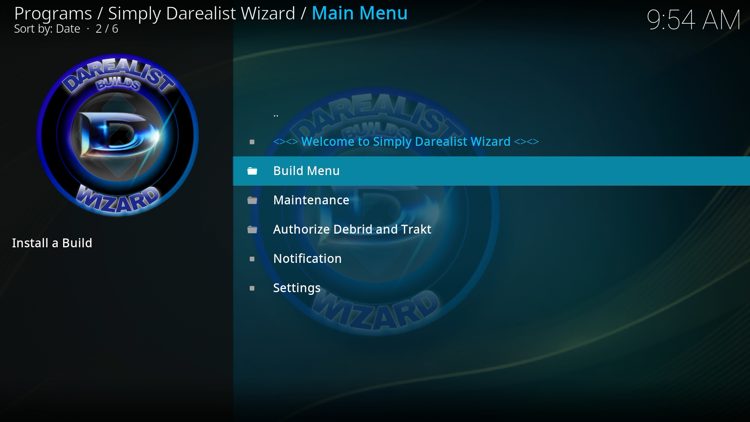
Credit: troypoint.com
Kodi Maintenance Tool Basics
The Kodi Maintenance Tool is designed to keep your Kodi media center running smoothly without much hassle. It handles routine cleanups and optimizations so you can focus on enjoying your content. Understanding the basics of this tool will help you maintain a faster, more reliable Kodi experience.
Key Features
- Cache Cleaning:Removes temporary files that can slow down Kodi over time.
- Package Removal:Deletes old or unused add-ons and repositories to free up space.
- Backup & Restore:Allows you to save your current setup and restore it if needed, protecting your customizations.
- Log File Management:Clears error logs that might clutter your system and help in troubleshooting.
- Database Maintenance:Repairs and optimizes Kodi’s database to improve loading times and stability.
Compatibility And Requirements
The Kodi Maintenance Tool works with most Kodi versions, especially the popular Kodi 18 Leia and Kodi 19 Matrix. It supports a wide range of devices including Windows PCs, Android boxes, Amazon Fire Stick, and Raspberry Pi.
Before installing, make sure your Kodi version is up to date for the best performance. The tool requires minimal storage space and runs efficiently without affecting your device’s overall performance.
Have you ever noticed Kodi slowing down or freezing? Using this tool regularly can prevent these issues and extend the life of your media setup.
Installation Steps
Getting the Maintenance Tool for Kodi up and running is simpler than you might think. The installation steps are straightforward, and once completed, you’ll have a powerful assistant to keep your Kodi system clean and efficient. Let’s break down the process so you can start optimizing your Kodi experience without hassle.
Downloading The Tool
First, you need to download the Maintenance Tool. Head over to a trusted Kodi add-on repository or the official website where the tool is hosted. Avoid random sources to protect your device from malware.
Make sure your Kodi allows installation from unknown sources:
- Go to Settings> System.
- Click on Add-ons.
- Enable Unknown Sources.
After this, you can download the tool’s ZIP file directly or install it through a repository inside Kodi.
Setup Process
Once downloaded, the setup is quick. Open Kodi, go to Add-ons, and select Install from ZIP file. Navigate to where you saved the Maintenance Tool ZIP and select it.
After installation, you’ll see the Maintenance Tool listed among your add-ons. Launch it to begin setup. The tool might ask for permissions to access files and storage—grant these so it can perform cleaning and backups efficiently.
Initial Configuration
When you open the Maintenance Tool for the first time, it will guide you through an initial configuration. You can set preferences such as automatic cache cleaning, backup intervals, and notification alerts.
Choose options that fit your usage patterns. For example, if you use Kodi daily, set cache cleaning to occur more frequently. This customization helps keep your system responsive without extra manual effort.
Have you thought about scheduling maintenance tasks rather than doing them manually? This tool lets you automate those chores, saving you time and preventing common Kodi slowdowns.
Optimizing Kodi Performance
Optimizing Kodi performance keeps your media center running smoothly. Over time, Kodi stores data that can slow it down. Cleaning and managing this data helps improve speed and responsiveness. The Maintenance Tool for Kodi offers simple ways to keep your system efficient.
Clearing Cache And Temporary Files
Cache and temporary files build up with use. These files store data for quick access but can become large. Clearing them frees up space and reduces lag. The Maintenance Tool quickly removes these files without losing important data. This process helps Kodi load faster and prevents crashes.
Removing Unused Add-ons
Unused add-ons take up space and slow Kodi. They may cause conflicts or errors. The Maintenance Tool identifies add-ons you no longer use. Removing them cleans your system and improves stability. Keep only the add-ons you need for a faster Kodi experience.
Managing Thumbnails And Packages
Thumbnails and package files grow over time. They help Kodi display images and install updates. Too many files can slow down Kodi’s interface. The Maintenance Tool helps delete old thumbnails and unnecessary packages. This keeps Kodi neat and responsive, improving overall performance.

Credit: certifiedmtp.com
Automation Options
The Maintenance Tool for Kodi offers several automation options to keep your media center running smoothly. These options reduce manual work and help maintain optimal performance. Automation ensures regular upkeep without you having to remember every task.
Automation options save time and avoid common issues like cache buildup or broken links. They make Kodi more reliable and faster by handling routine tasks on their own.
Scheduled Maintenance
Scheduled maintenance lets you set specific times for cleaning and updating Kodi. You can choose daily, weekly, or monthly intervals. This way, Kodi stays fresh without any effort from you.
You can schedule tasks such as:
- Clearing cache and thumbnails
- Removing unused addons
- Updating libraries and databases
Scheduling helps prevent slowdowns and errors caused by old data.
Auto-cleaning Features
Auto-cleaning features work quietly in the background. They remove temporary files and junk automatically. This keeps Kodi clean and fast without manual input.
Common auto-cleaning tasks include:
- Deleting cached images and video data
- Clearing expired or broken sources
- Removing empty folders
These features help Kodi run smoothly and save storage space.
Troubleshooting Common Issues
Encountering issues with Kodi can be frustrating, especially when it disrupts your streaming experience. The Maintenance Tool for Kodi offers straightforward ways to troubleshoot common problems. Understanding how to quickly fix these issues saves time and keeps your media center running smoothly.
Fixing Crashes And Freezes
If Kodi crashes or freezes, it’s often due to corrupted cache or conflicting add-ons. The Maintenance Tool lets you clear the cache easily, removing temporary files that slow down your system.
Try disabling recently installed add-ons to see if stability improves. Sometimes, outdated or incompatible add-ons cause Kodi to crash unexpectedly.
Have you checked your device’s storage? Insufficient space can also lead to freezes. The Maintenance Tool helps identify large files or unnecessary data you can delete to free up space.
Resolving Slow Loading Times
Slow loading can ruin the excitement of opening Kodi. The Maintenance Tool helps speed things up by cleaning up your database, which might be cluttered with old entries.
Regularly clearing thumbnails and packages can also boost performance. These files accumulate over time and can drag down Kodi’s responsiveness.
Consider updating your Kodi build through the Maintenance Tool. Using an outdated build often causes lag, so staying current ensures smoother operation.

Credit: troypoint.com
Alternative Maintenance Tools
Alternative maintenance tools for Kodi help keep your media center clean and fast. They offer different features to suit various needs. These tools can clear cache, remove old data, and fix common issues. Choosing the right tool saves time and improves Kodi’s performance.
Comparing Popular Options
| Tool | Key Features | User Friendliness | Update Frequency |
|---|---|---|---|
| Ares Wizard | Cache cleaning, backup, speed test | Easy | Regular |
| Indigo | Troubleshooting, log viewer, maintenance | Moderate | Frequent |
| OpenWizard | Build management, cleanup tools | Easy | Occasional |
| Supreme Builds Wizard | System cleanup, backup, restore | Moderate | Regular |
Pros And Cons
- Ares Wizard:Simple to use and rich in features. Sometimes updates can cause bugs.
- Indigo:Good for troubleshooting and fixing errors. Interface may confuse new users.
- OpenWizard:Great for managing builds and cleaning junk. Updates are less frequent.
- Supreme Builds Wizard:Offers backup and restore options. Can be slow on older devices.
Tips For Long-term Kodi Health
Keeping Kodi running smoothly over time requires more than just installing it and enjoying your favorite content. You need to actively maintain its health to avoid crashes, slowdowns, and frustrating errors. The Maintenance Tool for Kodi helps with this, but you also need some practical habits that support Kodi’s long-term stability.
Regular Updates
Are you updating Kodi and its add-ons regularly? Skipping updates often leads to compatibility problems and security gaps. The Maintenance Tool can help by checking for updates automatically, but you should also make it a habit to review notifications and update manually if needed.
Updates fix bugs and improve performance, so don’t ignore them. Even small patches can prevent bigger issues down the line. What’s more, if you delay updates, you risk losing access to new features or support for streaming services.
Backup Strategies
Have you ever lost your Kodi setup due to a corrupted file or failed update? Backups are your safety net. Use the Maintenance Tool’s backup feature or a reliable third-party add-on to save your settings, add-ons, and libraries regularly.
Store backups in multiple places like cloud storage and an external drive. This way, you can restore your Kodi system quickly without starting from scratch. Imagine how much time you save by avoiding the frustration of rebuilding your entire setup.
Frequently Asked Questions
What Is The Maintenance Tool For Kodi?
The Maintenance Tool for Kodi is a utility that helps optimize and clean your Kodi setup. It removes cache, deletes thumbnails, and manages backups. This tool improves Kodi’s performance and prevents crashes, ensuring a smoother streaming experience.
How Does The Maintenance Tool Improve Kodi Performance?
It clears unnecessary files like cache and thumbnails, which speed up Kodi. The tool also manages backups and updates add-ons. Regular use keeps Kodi running smoothly and reduces buffering or freezing issues.
Can The Maintenance Tool Fix Kodi Errors?
Yes, it can fix common Kodi errors by cleaning corrupted data and resetting settings. The tool also helps troubleshoot add-on problems, making Kodi more stable and reliable.
Is The Maintenance Tool Safe To Use With Kodi?
Absolutely. The Maintenance Tool is designed specifically for Kodi. It safely cleans files without harming your data or add-ons. Always download it from trusted sources to avoid security risks.
Conclusion
A maintenance tool for Kodi enhances your streaming experience. It keeps your system running smoothly. Regular updates and clean-ups prevent buffering. They also help avoid crashes. Easy to install and use. Perfect for keeping Kodi in top shape. A must-have for all Kodi users.
It ensures a seamless viewing experience. Maintain Kodi effortlessly with these tools. Enjoy uninterrupted streaming every time. Keep your entertainment hassle-free. Happy streaming!