Is your PC running slower than it used to? Are unexpected crashes and glitches driving you crazy?
You don’t have to settle for a frustrating computer experience. With the right maintenance tools, you can keep your PC running smoothly, boost its speed, and avoid costly repairs. You’ll discover the must-have PC maintenance tools that will save you time, protect your data, and make your computer feel brand new again.
Keep reading to find out how simple tools can make a big difference for your PC!
Essential Cleaning Tools
Keeping your PC clean is key to its performance and longevity. Dust and dirt can block vents and fans, causing overheating and slowdowns. Essential cleaning tools help remove debris safely and efficiently. They ensure your computer stays cool and runs smoothly.
Compressed Air Canister
Compressed air canisters blow dust from tight spaces. Use them to clean keyboards, fans, and vents. They reach spots where cloths cannot. Hold the can upright to avoid moisture. Short bursts prevent damage to delicate parts.
Microfiber Cloths
Microfiber cloths gently wipe screens and surfaces. They trap dust without scratching. Use them dry or slightly damp. Avoid paper towels or rough fabrics. These cloths keep your PC looking clean and clear.
Isopropyl Alcohol
Isopropyl alcohol removes stubborn grime and oils. Use 70% or higher concentration for best results. Apply it on a cloth, not directly on parts. It evaporates quickly, leaving no residue. Perfect for cleaning keyboards and exterior surfaces.
Soft Bristle Brushes
Soft bristle brushes sweep dust from circuit boards and components. They avoid static build-up that can harm electronics. Choose brushes with natural or anti-static bristles. Gently clean hard-to-reach areas without scratching.

Credit: www.amazon.com
Hardware Diagnostic Tools
Hardware diagnostic tools are essential for anyone who wants to keep their PC running smoothly. These tools help you identify and fix physical issues before they turn into costly problems. Having the right set of hardware tools can save you time, money, and frustration.
Multimeter
A multimeter is a must-have for checking electrical components in your PC. It measures voltage, current, and resistance, helping you detect faulty power supplies or damaged circuits. If your PC won’t start or shows random shutdowns, a multimeter can point you to the exact problem.
Using a multimeter might seem technical, but once you get comfortable, it’s like having a doctor for your PC’s hardware. Have you ever tried testing your power supply unit with one? It’s a simple step that can prevent you from buying a new PSU unnecessarily.
Thermal Paste
Thermal paste improves heat transfer between your CPU and its cooler. Over time, old paste dries out and loses efficiency, causing overheating. Reapplying thermal paste can reduce temperatures significantly and improve performance.
Don’t just grab any paste; quality matters. A good thermal paste spreads evenly and lasts longer. When was the last time you checked your CPU temperatures? If they’re higher than usual, refreshing the paste might be your solution.
Screwdriver Set
A reliable screwdriver set is fundamental for opening your PC case and handling internal components. Magnetic tips and various sizes make it easier to work without losing screws inside the chassis. Precision screwdrivers help you access tight spots without damaging delicate parts.
Think about how many times you’ve struggled with a wrong-sized screwdriver. Investing in a quality set makes your maintenance tasks quicker and less frustrating. What’s your go-to tool when you need to open your PC?
Cable Testers
Cable testers check the integrity of your internal and external cables. Faulty cables can cause intermittent connection issues or complete device failures. Testing cables before replacing them can save you unnecessary expenses.
These testers are simple to use and provide quick results. Have you ever experienced a USB device not working, only to discover it was a bad cable? A cable tester helps you identify that instantly.
Software Utilities
Software utilities keep your PC running smoothly and securely. They handle various tasks like cleaning junk files, protecting from viruses, and updating drivers. These tools improve performance and prevent common issues.
Using the right software utilities saves time and avoids frustration. They also help maintain system health over time. Here are essential types of software utilities every PC should have.
Antivirus Programs
Antivirus programs protect your PC from malware and viruses. They scan files and websites for threats. Real-time protection blocks harmful software before it can cause damage.
Good antivirus software updates regularly to catch new threats. It also removes viruses found on your PC. This keeps your data safe and your system stable.
Disk Cleanup Tools
Disk cleanup tools remove unnecessary files from your hard drive. These include temporary files, caches, and old logs. Clearing these files frees up space and speeds up your PC.
Some tools also help uninstall unused programs. They make your system less cluttered and easier to manage. Regular cleanup prevents slowdowns and system crashes.
System Monitoring Apps
System monitoring apps track your PC’s health in real time. They show CPU, memory, and disk usage. These apps help identify performance issues quickly.
They also monitor temperatures to prevent overheating. Alerts notify you if something goes wrong. Monitoring tools keep your PC stable and efficient.
Driver Updaters
Driver updaters keep hardware drivers current and compatible. Updated drivers improve device performance and fix bugs. They prevent crashes caused by outdated software.
These tools scan your system and find missing or old drivers. Installing updates ensures your PC hardware works well. This is key to a smooth computing experience.

Credit: www.amazon.com
Data Backup Solutions
Data backup is not just a smart idea; it’s a necessity. Losing important files due to hardware failure, accidental deletion, or malware can be devastating. Having reliable backup solutions ensures your data stays safe and accessible whenever you need it.
External Hard Drives
External hard drives offer a straightforward way to back up your data. They provide large storage space and fast transfer speeds, making it easy to save entire folders or your whole system image.
One thing to remember is to keep your external hard drive disconnected when not in use. This protects your backup from viruses or ransomware that might affect your main PC.
Cloud Storage Services
Cloud storage services keep your files safe online, letting you access them from any device. Services like Google Drive, Dropbox, and OneDrive offer free storage options with easy upgrades.
Cloud backups reduce the risk of losing data due to physical damage or theft. But ask yourself, how secure is your cloud provider’s encryption? Always use strong passwords and two-factor authentication.
Backup Software
Backup software automates the process, saving you time and reducing human error. Programs like Acronis True Image, Macrium Reflect, or even built-in tools in Windows and macOS can schedule regular backups for you.
Look for software that supports incremental backups. This means only new or changed files get saved, speeding up the process and saving storage space.
Usb Flash Drives
USB flash drives are small, portable, and perfect for quick backups of essential files. They are especially handy when you need to transfer data between different computers.
Remember, flash drives usually have limited storage compared to external hard drives or cloud services. Use them for critical documents rather than large media files.
Safety And Protection Gear
Safety and protection gear is essential for anyone working on PCs. These tools protect both the user and the computer parts. Without proper gear, static electricity or accidental slips can cause damage. Using the right safety equipment helps maintain the PC and keeps you safe during repairs or upgrades.
Anti-static Wrist Straps
Anti-static wrist straps prevent static electricity buildup on your body. Static can damage sensitive computer components. The strap grounds you by connecting to a metal part of the PC case. This simple tool reduces the risk of electrostatic discharge. Always wear it while handling internal PC parts.
Esd Mats
Electrostatic discharge (ESD) mats provide a safe work surface. Place your PC parts on the mat to avoid static damage. These mats connect to ground just like wrist straps. They create a controlled environment for repairs and upgrades. ESD mats protect delicate components during maintenance.
Protective Gloves
Protective gloves keep your hands safe from sharp edges inside the PC. They also prevent oils and dirt from your skin reaching components. Use gloves made from non-conductive materials to avoid static buildup. Gloves improve grip and reduce the chance of dropping parts.
Proper Lighting
Good lighting is vital for PC maintenance. It helps you see small screws and components clearly. Use bright LED lamps or desk lights focused on your workspace. Proper lighting reduces mistakes and speeds up repairs. Never work in dim or shadowy areas when maintaining a PC.
Credit: us.norton.com
Organizational Accessories
Keeping your PC workspace tidy isn’t just about looks—it actually helps your maintenance tasks go smoother. Organizational accessories reduce the time spent hunting for tools or untangling cords. They keep your work area efficient and stress-free, making every repair or upgrade quicker and more enjoyable.
Cable Management Tools
Cables can quickly turn into a messy web if you don’t control them. Using cable ties, clips, or sleeves keeps wires neat and prevents accidental unplugging or damage. Velcro straps are especially handy because you can reuse and adjust them easily as your setup changes.
Have you ever spent minutes untangling cables before starting a simple fix? Cable management tools save you from that hassle and protect your cables from wear and tear. Plus, a clean cable setup improves airflow and helps keep your PC cooler.
Storage Containers
Small parts like screws, jumpers, and adapters often get lost during PC maintenance. Transparent storage containers with compartments let you separate and see everything at a glance. This way, you avoid the frustration of missing pieces that can stall your project.
Using stackable containers also saves desk space and keeps your tools organized over time. Think about how much easier your work would be if every tiny component had its own spot. Wouldn’t that save you both time and headaches?
Labeling Supplies
Labels help you keep track of cables, parts, and tools—especially when working on complex builds or multiple PCs. Simple label makers or even masking tape and a marker can do the job effectively. Labeling makes reassembly faster and reduces mistakes.
Imagine unplugging several cables and having no clue where each goes. Labeling prevents that confusion and keeps your workflow smooth. It’s a small step that makes a big difference in maintenance accuracy.
Tool Kits
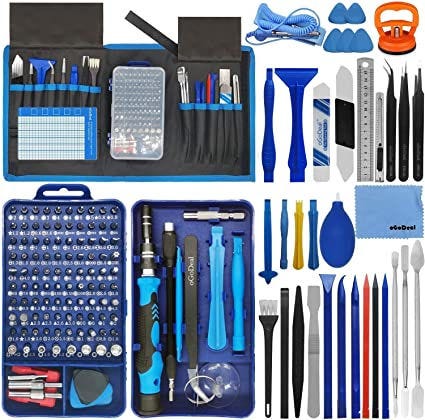
A well-rounded tool kit tailored for PC maintenance is invaluable. It should include screwdrivers with various heads, anti-static wrist straps, tweezers, and spudgers. Having all these tools neatly organized in a dedicated case ensures you’re ready for any task.
I once scrambled to find a tiny screwdriver mid-repair—losing focus and wasting time. Since then, I keep my tools in a compact kit that’s easy to grab and carry. Would your maintenance sessions benefit from a similar setup?
Frequently Asked Questions
What Are Essential Pc Maintenance Tools?
Essential PC maintenance tools include antivirus software, disk cleanup utilities, hardware diagnostic tools, and system optimizers. These tools help keep your PC secure, clean, and running efficiently by removing malware, freeing disk space, checking hardware health, and improving system performance.
How Often Should I Use Pc Maintenance Tools?
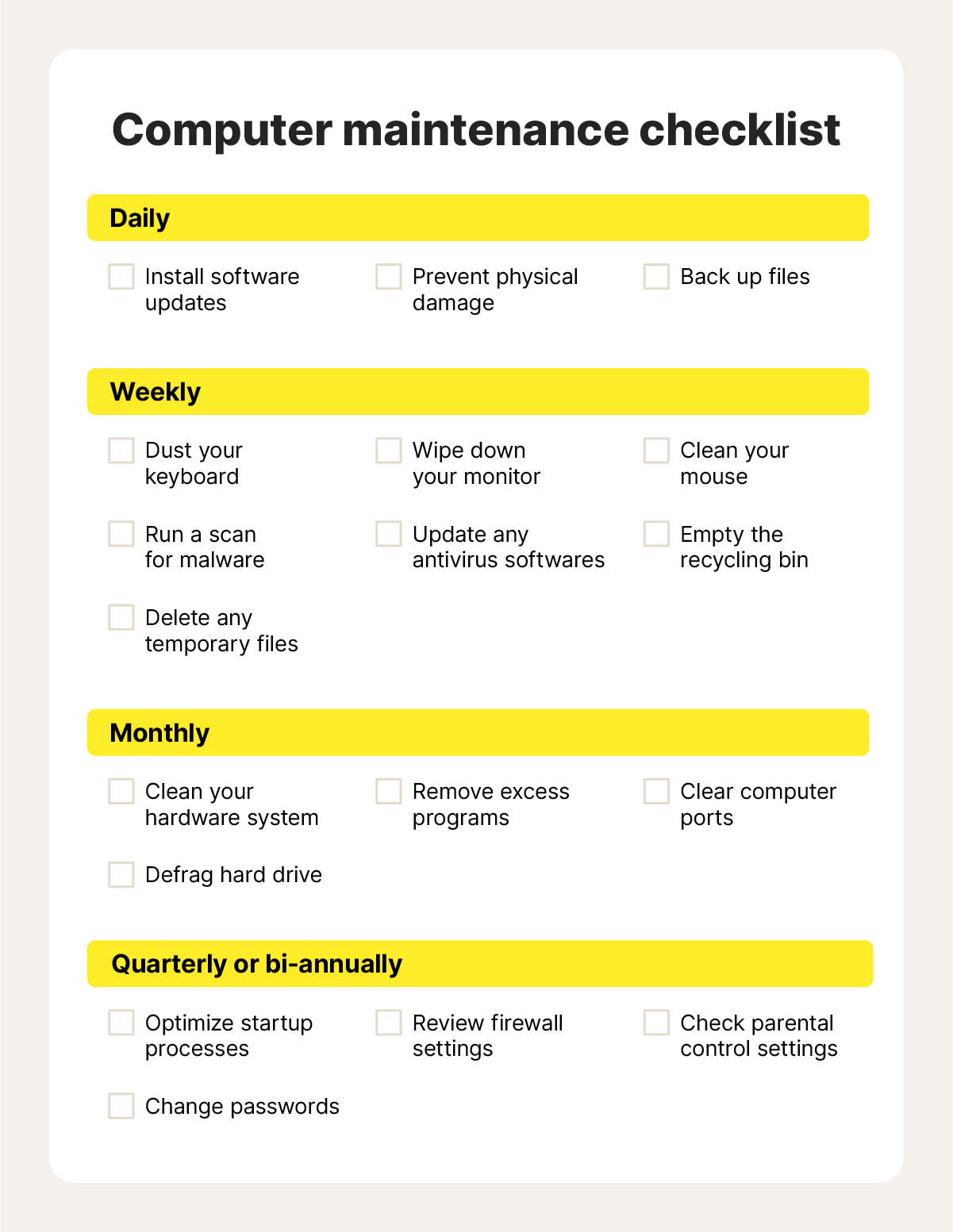
You should use PC maintenance tools at least once a month. Regular use prevents slowdowns, removes unwanted files, updates software, and detects hardware issues early. Frequent maintenance ensures your PC stays fast, secure, and reliable over time.
Can Pc Maintenance Tools Improve System Speed?
Yes, PC maintenance tools can improve system speed by cleaning junk files, optimizing startup programs, and fixing registry errors. They free up resources and reduce system clutter, resulting in faster boot times and smoother overall performance.
Are Free Pc Maintenance Tools Effective?
Many free PC maintenance tools offer basic cleaning and optimization features. However, premium tools often provide deeper scans and advanced repairs. Free tools are good for routine maintenance but may lack comprehensive protection and optimization.
Conclusion
Maintaining your PC is essential for smooth performance. The right tools make a difference. Regular checks prevent bigger problems. Clean your files often. Update your software regularly. Protect your system from viruses. Keep the hardware in good shape. These steps ensure a longer PC life.
Don’t ignore warning signs. Tools like cleaners, antivirus software, and disk defragmenters are important. They help in maintaining speed and efficiency. Stay proactive with your PC care. A well-maintained PC saves time and frustration. Happy computing!